• AppsNg
How to Install Facebook Marketplace Nearby Me App, How to Make Facebook Fan Page, How to Delete All Facebook Search History on FB , How to Login Instagram with Your Facebook , Marketplace Facebook Buy and Sell within Local Community – Marketplace Facebook Buy Sell , How to Deactivate FB Account Temporarily on Facebook, How to Find Blocked Facebook List to Unblock blocked Friends , How to Use the “Nearby Me Friends” FB Feature on Facebook , Facebook Customer Care Center & Email Help Supports Contact Addresses , How to Install Facebook Farmville Games
Showing posts with label Facebook Symbols. Show all posts

1000+ New Facebook Symbols

 Facebook Symbols, New Symbols     No comments   

1000+ New Facebook Symbols: The Facebook symbols can be used in various aspect and on different social media platforms, it can be used to decorate your Facebook status, Facebook about me section, Facebook messages, Facebook comments and even your Facebook username. This article will inform you of various Facebook symbols special characters, ASCII symbols, text signs, ALT code symbols which can be sent to friends and also makes your comment cool and fun.


Below are over a thousand newest Facebook symbols that is supported by majority of the social media platforms including Facebook, Twitter, Instagram, Pinterest, Gmail etc.
You may be wondering just how you can use these special Facebook symbols on any platform, don’t worry, you can simply duplicate any of your favourite symbols from below and then paste it on the page you wish to use it. It may sometime seems like you are duplicating letters but don’t bother, it will be changed to the symobls as soon as you paste it on the platform.
Read Also: How Many Friends Can I Add on Facebook
Before we jump straight into identifying the various new Facebook symbols, it is important you note that these symbols are frequently updated but nevertheless, they are are still very useful at any time
Below are all the Facebook symbols supported by most social media platforms;

Cool Symbols

ツ☮✈♋웃유☠☯♥✌✖☢☣☤⚜☸♨❖❤❥❦❧♡✗✘⊗♒Ω♦♠♥♣♢♤♡♧✦✧♔♕♚♛★☆✮✯☄☾☽☼☀☁☂☃☻ ☺۩♪ ♫ ♬✄✂✆✉∞ ♂ ♀ ☿▲▼△▽◆◇◕◔ʊϟღ回₪✓✔✕☥☦☧☨☩☪☫☬☭™©®¿¡№⇨❝❞∃⊥∀Ξ∞ΣΠ⌥⌘文⑂ஜ๏⚓⎈

Smileys
☹☺☻تヅツッシ Ü ϡﭢ

Copyright or registered trademark
™ ℠©®℗

Currency symbols
$ ₣ ¢ £ ¤ ¥ ฿₠₡₢₣₤₥₦₧₨₩₫₪€$¢﹩£¥₩

Double-struck letters
ℂℍℕℙℚℝℤ

Antique letter characters
ℬℰℯℱℊℋℎℐℒℓℳℴ℘ℛℭ ℮ ℌℑℜℨℵ

Triangles
▲◣◢◥▼△▽⊿◤◥△▴▵▶▷▸▹►▻▼▽▾▿◀◁◂◃◄◅

Maths Fractions
½⅓¾⅔⅕⅖⅗⅘⅙⅚⅛⅜⅝⅞

Comparison Signs
≂≃≄≅≆≇≈≉≊≋≌≍≎≏≐≑≒≓≔≕≖≗≘≙≚≛≜≝≞≟≠≡≢≣≤≥≦≧≨≩⊰⊱⋛⋚

Integrals
∫ ∬∭∮∯∰∱∲∳

Index/power numbers and letters
⁰² ⁱ⁴⁵⁶⁷⁸⁹⁺⁻⁼⁽⁾ⁿ₀₁₂₃₄₅₆₇₈₉₊₋₌₍₎

Originals
ᴬᴭᴮᴯᴰᴱᴲᴳᴴᴵᴶᴷᴸᴹᴺᴻᴼᴽᴾᴿᵀᵁᵂᵃᵄᵅᵆᵇᵈᵉᵊᵋᵌᵍᵎᵏᵐᵑᵒᵓᵔᵕᵖᵗᵘᵙᵚᵛᵜᵝᵞᵟᵠᵡᶛᶜᶝᶟᶠᶡᶢᶣᶤᶥᶦᶧᶨᶩᶪᶫᶬᶭᶮᶯᶰᶱᶲᶳᶴᶵᶶᶷᶸᶹᶺᶻᶼᶽᶾᶿₐ ₑ ₒ ₓ ₔ ᵢᵣᵤᵥ

Roman numerals
ⅠⅡⅢⅣⅤⅥⅦⅧⅨⅩⅪⅫⅬⅭⅮⅯⅰⅱⅲⅳⅴⅵⅶⅷⅸⅹⅺⅻⅼⅽⅾⅿ

BubbleNumbers
➀➁➂➃➄➅➆➇➈➉
➊➋➌➍➎➏➐➑➒➓

Alphabet letters
ⒶⒷⒸⒹⒺⒻⒼⒽⒾⒿⓀⓁⓂⓃⓄⓅⓆⓇⓈⓉⓊⓋⓌⓍⓎⓏ
ⓐⓑⓒⓓⓔⓕⓖⓗⓘⓙⓚⓛⓜⓝⓞⓟⓠⓡⓢⓣⓤⓥⓦⓧⓨⓩ
Check Out: Facebook Chat Application
Foreign characters
Arabic signs
ಐಓಔಕಖಗಘಙಝಞಲಶಹೀಾಿಧೈೋೌ೬ೂೄભમયરલળવશષસહ઼ઽાિીુૂૃૄૅેૈૉોૌ્ডঢণতথদধনপফবভমযরলশষসঁংঃঅআইঈউঊঋঌএঐওঔকখগহ

Chinese/Asian signs
㌹ – ㍭ – 頹 – 衙 – 浳 – 浤 – 搰 – 煤 – 洳 – 橱 – 橱 – 煪 – ㍱ – 煱 – 둻 – 睤 – 楤 – ぱ – – 椹 – ぱ – ㍵ – 畱 – 煵 – 田 – つ – 煵 – 엌 – 嫠 – 쯦 – 案 – 迎 – 是 – 從 – 事 – 網 – 頁 – 設 – 計 – 簡 – 大

Chess
♚♛♜♝♞♟♔♕♖♗♘♙

Cards
♦ ♠ ♥ ♣
♢♤♡♧

Hands
☚☛☜☝☞☟✌

Cross
☩☨☦✙✚✛✜✝✞✠

Snow/Star
❂⋆✢✣✤✥✦✧✩✪✫✬✭✮✯✰★✱✲✳✴✵✶✷✸✹✺✻✼❄❅❆❇❈❉❊❋╰☆╮✡❂ -‘๑’- ⎈

Flower
✽✾✿❀❁❃❋

Music
♪ ♫ ♩♬♭♮♯°ø

Weather: sun, rain, snow, temperature
☼☀❂☁☂☃☄☾☽❄☇☈⊙☉℃℉°❅✺ϟ

Beliefs
✌☮♆卐

Religious
☪✡†☨✞✝☥☦☓♁☩

Political
Ⓐ☭✯

Gender, love, heart
♥ ❤❥❣❦❧♡♋ ♂ ♀ ☿웃유ღ۵

Text-message, Write
✉✍✎✏✐✑✒⌨

Checked
☑✓✔√

No/Unchecked
☐☒☓✕✖✗✘✇

Percent
% ℅ ‰ ‱

Pushpin
☌

Escape, delete, sub, country shortcuts
␛␡␚␟␘␠␤␋␌␍␎␏␐␑␒␓␔␕␖␗␙␜␝␞

Corners
┌ ┍┎┏┐┑┒┓└┕┖┗┘┙┚┛├┝┞┟┠┡┢┣┤┥┦┧┨┩┪┫┬┭┮┯┰┱┲┳┴┵┶┷┸┹┺┻┼┽┾┿╀╁╂╃╄╅╆╇╈╉╊╋╌╍╎╏═║╒╓╔╕╖╗╘╙╚╛╜╝╞╟╠╡╢╣╤╥╦╧╨╩╪╫╬

Blocks, box
❏❐❑❒▀▁▂▃▄▅▆▇▉▊▋█▌▍▎▏▐░▒▓▔▕▖▗▝▝▘▞▚▙▟▛▜
■ □ ▢▣▤▥▦▧▨▩▪▫▬▭▮▯☰☲☱☴☵☶☳☷

Scissors
✁✂✃✄

Telephone
✆☎☏

Quotes
❝❞ «» ‶‷‴‹›⟨⟩‸^ ′″‵‘ ’‚‛“ ”„‟

Time
⌚⌛

Round objects, circles
❂ ○ ◎●◯◕◔◐◑☢⊗⊙◘◙◍

Question, exclamation marks
❢❣⁇⁈⁉‼‽! !

Pointers, Arrows
➟➡➢➣➤➥➦➧➨➚➘➙➛➜➝➞➸♐➲➳➳➴➵➶➷➸➹➺➻➼➽←↑→↓↔↕↖↗↘↙↚↛↜↝↞↟↠↡↢↣↤↥↦↧↨➫➬➩➪➭➮➯➱↩↪↫↬↭↮↯↰↱↲↳↴↵↶↷↸↹↺↻↼↽↾↿⇀⇁⇂⇃⇄⇅⇆⇇⇈⇉⇊⇋⇌⇍⇎⇏⇐⇑⇒⇓⇔⇕⇖⇗⇘⇙⇚⇛⇜⇝⇞⇟⇠⇡⇢⇣⇤⇥⇦⇧⇨⇩⇪⌦⌧⌫⇫⇬⇭⇮⇯⇰⇱⇲⇳⇴⇵⇶⇷⇸⇹⇺

Planets
☉ Sun, ☽☾●◯ Moon, ☿ Mercury, ♀ Venus, ⊕♁ Earth, ♂ Mars, ♃ Jupiter, ♄ Saturn, ♅ Uranus, ♆ Neptune, ♇ Pluto, ⚳ Ceres. ☄ Comet.
See Also: Facebook Login

MixSymbols

Æ æ❖℘ℑℜℵ♏ηαβεℓℓα·¨…¦┅┆┈┊╱╲╳¯–—≡჻░▒▓▤▥▦▧▨▩█▌▐▀▄◠◡╭╮╯╰│┤╡╢╖╕╣║╝╜╛┐└┴┬├─┼╞╟╚╔╩╦ ╠═ ╬╧╨╤ ╥╙╘╒╓ ╫╪┘┌{。^◕‿◕^。} (◕^^◕) ✖✗✘♒♬✄✂✆✉✦✧♱♰♂♀☿❤❥❦❧™®©♡♦♢♔♕♚♛★☆✮✯☄☾☽☼☀☁☂☃☻☺☹☮۞۩εїз☎☏¢☚☛☜☝☞☟✍✌☢☣☠☮☯ ♠♤♣♧♥♨๑❀✿ψ☪☭♪♩♫℘ℑℜℵ♏ηαʊϟღツ回 ₪™ ©®¿¡½⅓ ⅔¼¾⅛⅜⅝⅞℅№⇨❝❞◠◡╭╮╯╰★☆⊙¤㊣★☆♀◆◇▆▇██■▓回□〓≡╝╚╔╗╬ ═╓╩ ┠┨┯┷┏┓┗┛┳⊥﹃﹄┌ ┐└┘∟「」↑↓→ ←↘↙♀♂┇┅﹉﹊﹍﹎╭╮╰╯ *^_^* ^*^ ^-^ ^_^ ^︵^∵∴‖︱︳︴﹏﹋﹌♂♀ ♥♡☜☞☎☏⊙◎☺☻►◄▧▨♨◐◑↔↕▪▫☼♦▀▄█▌▐░▒▬♦◊◦☼♠♣▣▤▥▦▩ぃ◘◙◈♫♬♪♩♭♪の☆→あ£❤。◕‿◕。✎✟ஐ ≈๑۩۩.. ..۩۩๑๑۩۞۩๑✲❈➹ ~.~◕‿-。☀☂☁【】┱┲❣✚✪✣✤✥✦❉❥❦❧❃❂❁❀✄☪☣☢☠☭♈✓✔✕✖㊚㊛ *.:。✿*゚‘゚・⊙¤㊣★☆♀◆◇◣◢◥▲▼△▽⊿◤◥▆▇██■▓
回□〓≡╝ ╚╔╗ ╬═╓╩ ┠┨┯┷┏┓┗┛┳⊥﹃﹄ ┌┐└┘∟ 「」↑↓→←↘↙♀♂┇┅﹉﹊﹍﹎╭╮╰╯ *^_^* ^*^ ^-^ ^_^ ^︵^∵∴‖︱︳︴﹏﹋﹌♂♀♥♡☜☞☎☏⊙◎☺☻►◄▧▨♨◐◑↔↕▪▫☼♦▀▄█▌▐░▒▬ ♦◊◦☼ ♠♣▣▤▥▦▩ぃ◘◙◈♫♬♪♩♭♪の☆→あ£❤。◕‿◕。✎✟ஐ≈ ๑۩۩.. ..۩۩๑๑۩۞۩๑✲❈➹ ~.~◕‿-。☀☂☁【】┱┲❣✚✪✣✤✥✦❉❥❦❧❃❂❁❀✄☪☣☢☠☭♈✓✔✕✖㊚㊛ *.:。✿*゚ ‘゚・ ◊♥╠═╝▫■๑»«¶ஐ©† εïз♪ღ♣ ♠•± °•ิ.•ஐஇ *×○▫♂•♀◊©¤ ▲↔™®☎εїз♨☏☆★▽△▲∵∴∷#♂♀♥♠♣
♧♤♧♡♬♪♭♫♪ﻬஐღ ↔↕↘••●¤╬﹌▽☜♥☞♬✞♥♕☯☭☠☃─━│ ┃┄┅┆┇┈┉┊┋╭
╮╯╰╱╲╳╴╵╶╷╸╹╺╻╼╽╾╿▰▱◆◇◈◉◊○◌◍◎●◐◑◒◓◔◕◖◗◘◙◚◛◜◝◞◟◠◡◢◣◤◥◦◧◨◩◪◫◬◭◮◯◰◱◲◳◴◵◶◷◸◹◺◻◼◽◾◿☀☁☂☃☄★☆☇☈☊☋☌☍☎☏☐☑☒☓☔☕☖☗☘☙☟☠☡☢☣☤☥☦☧☨☩☪☫☬☭☮☯☰☱☲☳☴☵☶☷☸☹☺☻☼☽☾☿♀♁♂♃♄♅♇♔♕♖♗♘♙♚♛♜♝♞♟♠♡♢♣♤♥♦♧♨♰♱´῾ ‌ ‐‑‒–—―‖‗‘’‚‛“”„‟†‡•‣․‥…‧‰‱′″‴‵‶‷‸‹›※‼‽‾‿⁀⁁⁂⁃⁄⁅⁆⁊⁋⁌⁍⁎⁏⁐⁑⁒⁓⁔⁕⁖⁗⁘⁙⁚⁛⁜⁝⁞ₕₖₗₘₙₚₛₜ₠₡₢₣₤₥₦₧₨₪₫€₭₮₯℀℁ℂ℄℅℆ℇ℈℉ℊℋℌℍℎℏℐℑℒℓ℔ℕ
№ ℗ ℘ℙℚℛℜℝ℞℟℡™℣ℤ℥Ω℧ℨ℩ K Åℬℭ℮ℯℰℱℲℳℴℵℶℷℸℹ℺℻ℼ
ℽℾℿ⅀⅁⅂⅃⅄ⅅⅆⅇⅈⅉ⅊⅋⅌⅍ⅎ⅏⅐⅑⅒⇫⇬⇭⇮⇯⇰⇱⇲⇳⇴⇵⇶⇷⇸⇹⇺⇻⇼⇽⇾⇿∀∁∂∃∄∅∆∇∈∉∊∋∌∍∎∏∐∑−∓∔
∕ ∖∗∘∙√∛∜∝∞∟∠∡∢∣∤∥∦∧∨∩∪∴∵∶∷∸∹∺∻∼∽∾∿≀≁≪≫≬≭≮≯≰≱≲≳≴≵≶≷≸≹≺≻≼≽≾≿⊀⊁⊂⊃⊄⊅⊆⊇⊈⊉⊊⊋⊌⊍⊎⊏⊐⊑⊒⊓⊔⊕⊖⊗⊘⊙⊚⊛⊜⊝⊞⊟⊠⊡⊢⊣⊤⊥⊦⊧⊨⊩⊪⊫⊬⊭⊮⊯⊰⊱⊲⊳⊴⊵⊶⊷⊸⊹⊺⊻⊼⊽⊾⊿⋀⋁⋂⋃⋄⋅⋆⋇⋈⋉⋊⋋⋌⋍⋎⋏⋐⋑⋒⋓⋔⋕⋖⋗⋘⋙⋚⋛⋜⋝⋞⋟⋠⋡⋢⋣⋤⋥⋦⋧⋨⋩⋪⋫⋬⋭⋮⋯⋰⋱⋲⋳⋴⋵⋶⋷⋸⋹⋺⋻⋼⋽⋾⋿⌀⌁⌂⌃⌄⌅⌆⌇⌈⌉⌊⌋⌌⌍⌎⌏⌐⌑⌒⌓⌔⌕⌖⌗⌘⌙⌚⌛⌜⌝⌞⌟⌠⌡⌢⌣⌤⌥⌦⌧⌨⟨⟩⌫⌬⌭⌮⌯⌰⌱⌲⌳⌴⌵⌶⌷⌸⌹⌺⌻⌼⌽⌾⌿⍀⍁⍂⍃⍄⍅⍆⍇⍈⍉⍊⍋⍌⍍⍎⍏⍐⍑⍒⍓⍔⍕⍖⍗⍘⍙⍚␋␢␣─━│┃┄┅┆┇┈┉┊┋┌┍┎┏┐┑┒┓└ ┕┖┗┘┙┚┛├┝┞┟┠┡┢┣┤┥┦┧┨┩┪┫┬┭┮┯┰┱┲┳┴┵┶┷┸┹┺┻┼┽┾┿╀╁╂╃╄╅╆╇╈╉╊╋╌╍╎╏═║╒╓╔╕╖╗╘╙╚╛╜╝╞╟╠╡╢╣╤╥╦╧╨╩╪╫╬ ╭╮╯╰╱╲╳╴╵╶╷╸╹╺╻╼╽╾╿▀▁▂▃▄▅▆▇█▉▊▋▌▍▎▏▐░▒▓▔▕▖▗▘▙▚▛▜▝▞▟■□▢▣▤▥▦▧▨▩▪▫▬▭▮▯▰▱◆◇◈◉◊○◌◍◎●◐◑◒◓◔◕◖◗◘ ◙ ◚◛◜◝◞◟◠◡◢◣◤◥◦◧◨◩◪◫◬◭◮◯◰◱◲◳◴◵◶◷◸◹◺◻◼◽◾◿☀☁☂☃☄★☆☇☈☊☋☌☍☎☏☐☑☒☓☔☕☖☗☘☙☟☠☡☢☣☤☥☦☧☨☩☪☫☬☭☮☯☰☱☲☳☴☵☶☷☸☹☺☻☼☽☾☿♀♁♂♃♄♅♇♎♏♐♑♒♓♔♕♖♗♘♙♚♛♜♝♞♟♠♡♢♣♤♥♦♧♨♰♱☫ª ↀↁↂↃↄↅↆↇↈ↉

Zodiac signs – astronomical symbols

♈ – Aries (The Ram)
♉ – Taurus (The bull)
♊ – Gemini (The Twins)
♋ – Cancer (The Crab)
♌ – Leo (The Lion)
♍ – Virgo (The Virgin)
♎ – Libra (The Scales)
♏ – Scorpio (The Scorpion)
♐ – Sagittarius (Centaur The Archer)
♑ – Capricorn (Goat-horned, The sea goat)
♒ – Aquarius (The water bearer)
♓ – Pisces (The fish)

Now you can choose from the above symbols so you can add them to your Facebook comment page or status. I hope this article was a lot helpful in identifying the new set of Facebook symbols? Kindly help to share this article with your loved ones.
Read More
  • Share This:  
  •  Facebook
  •  Twitter
  •  Google+
  •  Stumble
  •  Digg

Facebook Symbols and Their Meaning

 Facebook Symbols, Meaning of Symbol     No comments   

Facebook Symbols and Their Meaning: I believed you must have noticed various Facebook symbols while scrolling through your Facebook page, these little icons are scattered in different locations on the Facebook page and each has its specific meaning and function. 


All these little icon or symbols may seems confusing for those that are new to Facebook especially those that just created their first account with Facebook. Though some of these icons are self-explanatory but not everyone that log on to Facebook on a daily basis knows this things and what they are used for.
Read Also: Facebook Signup
In order not to chase all these newbies away from Facebook, this article will educate you on the various Facebook symbols and their meanings. For easier and faster learning sake, I have divided these icons into two; the common icons and the ambiguous icons. So let’s start with the common ones below;
The most common icon used by Facebook users is the “Like” icon. It is a hand symbol doing a thumb up. With this icon you can like any post on Facebook, you can also like comments, pages etc.

Just at the topmost part of your Facebook page, you will discover four icons;
The first represent your Facebook timeline or news feed, where you get all your recent posts as well as your friend’s recent post.

The second icon looks like two people standing side by side, this is the friend’s icon, with this icon you can check up those that sent you a friend request and accept or reject them, you can also check your friend list as well as suggested friends list.

The third icon which is the image of the earth represent Facebook notifications, with it, you can get check all your notifications.
Check Out: WWW Facebook com Mobile Download
And lastly, the three horizontal bars, this is the option icon which reveals some other Facebook options such as profile, groups, page, settings and so on.

Now moving down a bit, you will discover an edit field which states “What’s on your mind?” slightly above it, there are three important icons; a pen which enables you to create posts, a gallery icon which helps to add photo or video from your gallery and a video camera icon which allows you to capture live video for your post.

Then just below the edit field, there are some other icons, the location icon enable you pinpoint a location to share on your post, the next is the sticker icon which enables addition of various stickers into your post. Then just to the right, the Feeling/Activity iconwhich allows you to share your present feelings or action with your friends or other Facebook users. Lastly, the Tag friends icon this will allow you add some of your friends name into the post. 


When typing whatever is on your mind into the edit field, you will discover a smiley icon just at the extreme right of the field, there you can select any emoji of your choice to add into the post. 


Ambiguous Facebook Symbols

These set of symbols are well recognized by usual Facebook users but for newbies on facebook, it may be a bit hard to know what exactly they are used for.
So let’s start with the icon found in your profile, just at your main profile page to the left-hand side, you’ll notice the “Explore” section which contains lots of icons listed. 


Recommended: Facebook Privacy Settings
The first icon on the list which is the blue group icon, is actually to create and/or access your groups. The next which looks like a calendar is the event icon, it is used to create events and remainder on Facebook. Now below that is the flag-like icon which represent the pages, here you discover all the pagesyou are included and also checkout some other cool pages you could join. The next white icon with two blue person image, this is the friend list icon where you can check those that are your friends on Facebook. The ribbon-like icon which is next represent the Saved icon, where you’ll discover all the posts and pages you’ve saved on Facebook. The wrench-like icon is the icon to manage your apps, you can either add up some app or remove some on your Facebook account. The game icon is for playing all sort of Facebook games. The blue chart represent the Ads Manager, where you can publish advert on your Facebook page. And lastly, the clock arrow icon labelled “On This Day“, which enables you to search out specific post you made years back.

If you decide to click the “see more”, more icons will be revealed as shown below;


Fundraisers: for money donations to worthy causes, you can as well start up yours
Live Video: here you will find all sorts of arbitrary live video posted on Facebook
Pokes: here you will discover those you poked as well as those that poked you
Pages Feed:here you will discover all activities from your Liked pages.
Games Feed: also you will get to see all activities from your games on Facebook.
Suggest Edits: here you can give advance information about places by sharing information you know about them with Facebook.
Notes: here you can write blogs and share it into your Facebook
Photos: this is a gallery of all your photos uploaded to Facebook and those you were tagged in.
Offers: this is your collection of saved company offers directly from Facebook.
Recent Ad Activity:this will show you all the ads you clicked on recently
Payment History: Only relevant if you buy Facebook ads or otherwise pay Facebook for services.

Though some icons are not mentionbut those above are the necessary one which is relevant to surf Facebook with ease.

I hope this was beneficial? Kindly share this with those that are new to Facebook so they can learn what those Facebook symbols are used for.
Read More
  • Share This:  
  •  Facebook
  •  Twitter
  •  Google+
  •  Stumble
  •  Digg

Facebook Symbols

 Facebook Symbols     No comments   

Facebook Symbols: A Guide To Facebook Symbols and What they all mean
Have you ever noticed how many little Facebook symbols are scattered throughout the Facebook landscape? There has to be a Facebook team in some back cubicle at headquarters just thinking up what little image Facebook could offer next.

Whatever the reason for so many little images, the one thing it can do is cause a bit of confusion for newcomers. While many of the tiny icons are self-explanatory, for many people who are not only new to Facebook but also new to computers, some of these images can be a real mystery.

In the past, here at MUO, we’ve helped new users navigate through Facebook. Rob showed you the most recent Facebook Messenger features. And Dan showed you the ins and outs of following and followers on Facebook. Today, I’m going to put together a quick reference guide that you can use when one of those little Facebook symbols really has you stumped.10 Facebook Messenger Features You Must Try 10 Facebook Messenger Features You Must Try

We've done some digging and found even more features that could make Messenger more useful for you.


Simple Facebook Symbols

I’ve separated all of these Facebook Symbols into two groups – the common icons most people recognize, and then the obscure ones a lot of people don’t know about.
One of the most recognizable images both inside and outside of Facebook – this is the famous “Like” icon. You can Like a status update, quote, link, image or anything else? Click this image and let everyone know.
At the top of your Facebook home page, you’ll notice three dark icons. The image of earth represents your notification list of all of the latest updates from your friends, as well as your favorite pages and groups.
Click on this little conversation bubble icon, and you’ll see a dropdown box displaying the latest Facebook messages you’ve received.
Finally, the last image at the top of the home page is the “Friend Request” icon. Click on this, and if you have any new friend requests, they’ll show up in a drop-down box.
The following icons are well known by most Facebook users, so I won’t waste much time on them.

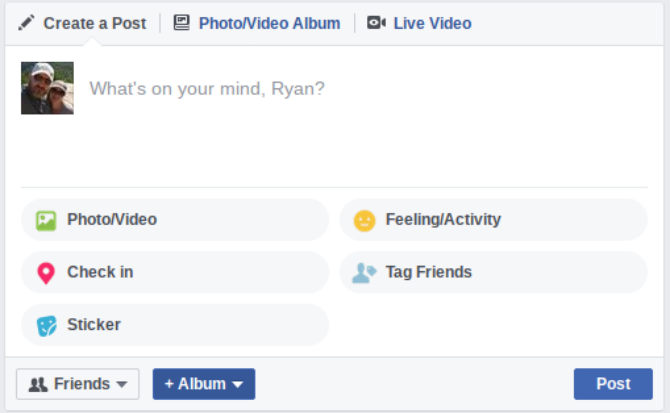
Above your edit field, you’ll see three symbols; a pen (to edit the post), a computer (to add a photo or video to your post) or a video camera (to capture live video for your post).How to Watch Facebook Videos on Your TV How to Watch Facebook Videos on Your TVIf you want to share a Facebook video with your entire living room, then the best thing to do is cast the video right onto your TV.


Starting from the upper-left under the edit field, you’ll see the icon for sharing photos or videos (either captured live or from files saved on your computer or mobile device). To the right of that you’ve got the “Feeling/Activity” icon where you can share with everyone how you’re feeling right now.


Next row on the left is the “Check in” icon which lets you use your GPS (or selected) location to share where you’re located with your Facebook friends. To the right of that is the “Tag Friends” icon where you can tag any of your friends you’ve mentioned in your post or your shared photo.Facebook Adds Live Location Tracking to Messenger Facebook Adds Live Location Tracking to Messenger  You have been able to share your location on a one-off basis for some time, but Facebook has now added real-time location sharing to the mix. What could possibly go wrong?!


Finally, there’s the “Sticker” icon, which is a lot like the “Feelings” icon, except that when you click on it, you can apply a big (some would say gaudy) sticker/picture from a pre-made list of “stickers” you can choose from.


Click on any one of these icons to add that type of content to your wall.

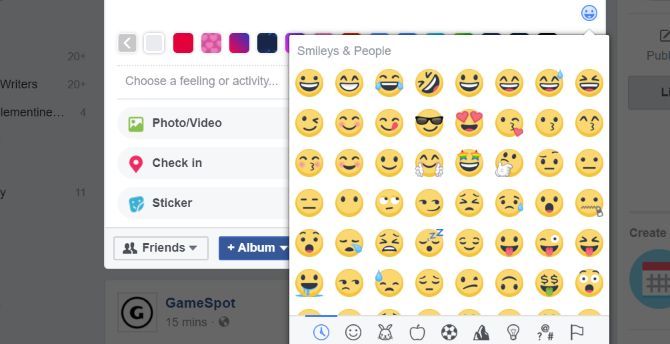
By the way — if you want to see the largest collection of Facebook symbols anywhere, while you’re editing or creating a post, just click on the “emoji” face to the lower left of the edit field.


Yes, this is where you find smiley faces everyone uses. But as you can see from the row of other icons, you can find pages and pages of emoji. You’ll find everything from animals and electronics to sports and flags. Have fun!


Dealing With Facebook Posts

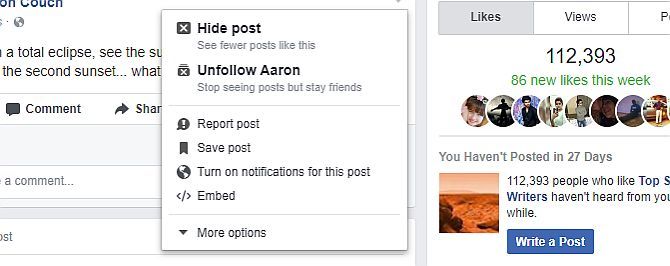
The last few most common icons are the ones that show up in the box below, when you click the down arrow to the upper right of a post.


This window appears with different options depending on where the post is and who posted it. In the example above, the post was published by someone else and shows up on my timeline. The top icon “Hide post” lets you let Facebook now you don’t like the post and want to see fewer posts from that person. Or if you don’t want to see anything at all from that person, you can click the next icon down to “Unfollow” the person.

The third icon down is the comment bubble with an exclamation. This is to report the post to Facebook as troublesome. The next icon is to save the post to your Facebook bookmarks. The globe icon is to enable notifications so if anyone posts a comment, you’ll get a notification for it. And finally, the last icon is to get code that will let you embed the post anywhere else outside of Facebook.


One Overlooked Feature That Makes Facebook More Productive One Overlooked Feature That Makes Facebook More Productive Facebook is fantastic, but it can be a productivity drain. If you sit to read each link, you'll be spending far more time on Facebook than is healthy for you. What to do? This


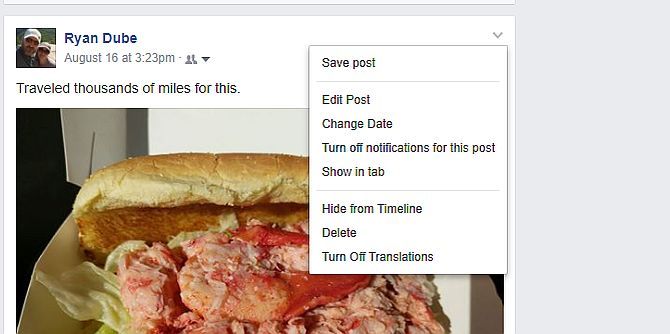
If you click the down arrow at the upper right of one of your own posts, you’ll have many more options — but none of them include any special Facebook symbols.


These are just options to change the post in some way, or even delete it entirely.

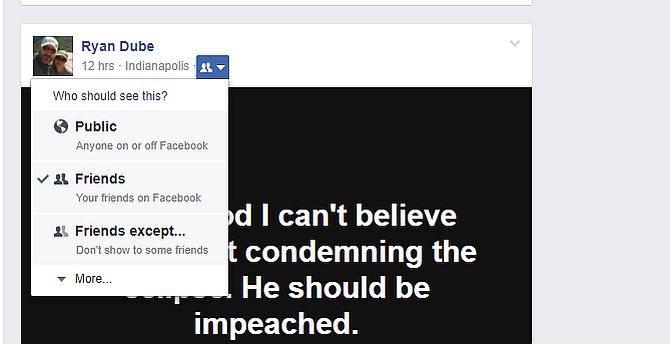
Just above the post, next to your name, you’ll see an icon of two people with a small arrow to the right. Click on the arrow and you’ll see another window like the one below.


This is an important dropdown, because it allows you to set the privacy level of your posts. This is something too few people pay attention to — but it can mean the difference between things being seen only by family and friends, or by the entire internet.

If you click the top globe icon, your post will be visible to the whole web. If you click any of the icons below it, you can set it to only show up for your immediate friends, friends of friends, or you can actually block the post from specific friends if you want to.4 Vital Facebook Privacy Settings You Should Check Right Now 4 Vital Facebook Privacy Settings You Should Check Right Now Facebook's been changing privacy options again. As usual, the default option is for you to be oversharing your details, so here's what you need to know to set things right.
Obscure Facebook Symbols

The next batch of Facebook symbols are well known to regular Facebook users, but may not be quite as recognizable to brand new users. How many of these do you recognize?

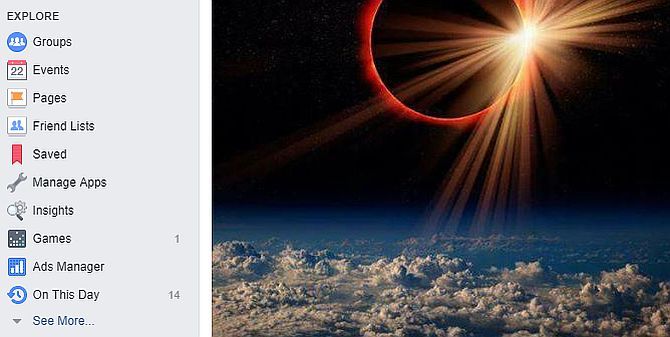
If you scroll down on your main profile page and look to the left, you’ll see an “Explore” area in the left navigation bar. There are many unusual icons here.


The blue circle with images of people represents “Groups” on Facebook that you can join. The Calendar page is to find events in your area (or online events) posted on Facebook. The flag icon is where you’ll find Facebook Pages that might interest you. The white square with blue people images is where you can go to set up or edit your Friend Lists. The red ribbon is where you’ll find all the posts and pages you’ve saved.How to "Friend" Someone on Facebook & Hide It From Your Status Updates How to "Friend" Someone on Facebook & Hide It From Your Status UpdatesDon't want everyone to know you've got a new Facebook friend? Here's how to hide your new connections from your wall, status updates, and News Feed.

The wrench is to add or remove apps from your Facebook account. The small game screen is fairly obvious — it’s where you’ll find Facebook Games to play. The blue chart is the Ads Manager dashboard, which is a special Facebook area for online publishers and other Facebook advertisers. And the clock with an arrow around it is “On This Day“, where you’ll find posts you made many years ago, on today’s date.


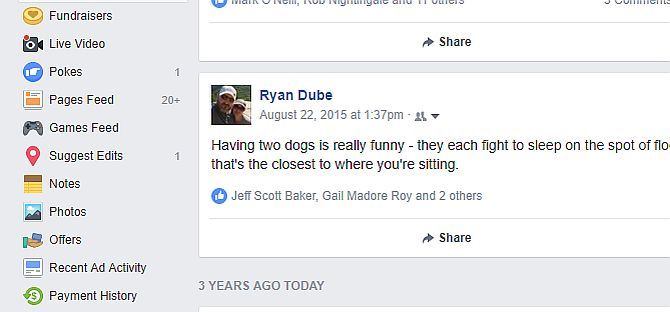
If you click on See More, you’ll see the icons above, in the following order:
Fundraisers – where you can donate money to worthy causes (or start your own).
Live Video – Where you can find all sorts of random live video published on Facebook (or stream your own)
Pokes – Where you can see who poked you or poke someone (I really wish Facebook would get rid of this feature…).
Pages Feed – A feed of all activity from your Liked pages.
Games Feed – A feed of all activity from your games.
Suggest Edits – You can improve information about places around you by sharing information you know about them with Facebook.
Notes – Did you know you can basically write a blog post on Facebook? Yup, that’s what a Note is
Photos – A collection of all of your photos and albums.
Offers – Your collection of saved company offers from Facebook.
Recent Ad Activity – Do you click on ads? Find out by clicking on this symbol.
Payment History – Only relevant if you buy Facebook ads or otherwise pay Facebook for services.

Didn’t realize you could do so much on Facebook? Well, we’re not even done yet. Scroll down some more and you’ll see the following symbols in the left navigation menu.


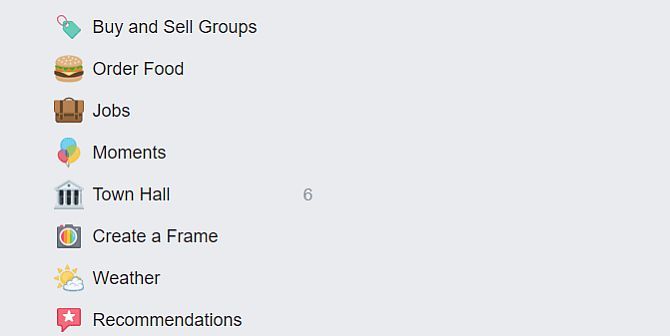
Here’s what these icons mean, from the top down.
Order Food – I know it sounds crazy, but you can get to the order page of local restaurants by using this link.
Jobs – Scan through local jobs and see if anything strikes your fancy.
Moments – Create shared photo albums with friends and family.
Town Hall – Want to get in touch with your local political representatives? This is where you can do it.
Create a Frame – Yes, this is where your Facebook friends create those silly photo frames around their Facebook photos.
Weather – Quickly get today’s weather as well as the forecast for the rest of the week.
Recommendations – Ask your friends for recommendations, or offer a few of your own.

Did this guide help you identify any new Facebook icons that you never knew about? Do you know of any other strange or obscure icons that aren’t on this list? Share your insight in the comments section below.


Read More
  • Share This:  
  •  Facebook
  •  Twitter
  •  Google+
  •  Stumble
  •  Digg
Older Posts Home
How to Install Facebook Marketplace Near Me App

How to Create a Facebook Business Page

How to Completely Delete Facebook Search History

How to Sign in or Login Instagram with Your Facebook

Marketplace Facebook Buy and Sell within Local Community – Marketplace Facebook Buy Sell App

How to Deactivate FB Account Temporarily on Facebook

How to Find Blocked Facebook List to Unblock blocked Friends

How to Use the “Near Me Friends” Facebook Feature

FB Customer Care Center & Email Help Supports Contact Addresses

How to Install & Play the Facebook Farmville Games
How to Install Facebook Marketplace Near Me App

How to Create a Facebook Business Page

How to Completely Delete Facebook Search History

How to Sign in or Login Instagram with Your Facebook

Marketplace Facebook Buy and Sell within Local Community – Marketplace Facebook Buy Sell App

How to Deactivate FB Account Temporarily on Facebook

How to Find Blocked Facebook List to Unblock blocked Friends

How to Use the “Near Me Friends” Facebook Feature

FB Customer Care Center & Email Help Supports Contact Addresses

How to Install & Play the Facebook Farmville Games

Pages

  • Home
  • Contact Us
  • Privacy Policy
  • Disclaimer

Enter your email address:

Blog Archive

Posts

  • 2go Latest Version 7.1.3 | 2go Download from www.2go.im
    Hi there, welcome to my latest post on 2go latest version 7.0.3 downloads from 2go website (www.2go.im). This latest version is simila...
  • GOTV Customer Care Number in Nigeria
    This is the different route you can contact GOTV to resolve your problems:
  • Manage Blocking On Facebook
    Manage Blocking On Facebook: Every so often, Facebook revamps their privacy settings to make them more user friendly. Among the most recent...
  • Cipcup Mp3 Music Download / Videos / Cipcup.jw.it games
    Cipcup Mp3 Music Download is the best and most trusted source for free mobile apps download. Www.Cipcup.jw.it is easy to browse, preview, ...
  • Delete Facebook Account Permanently - Delete My Account Right Now | Delete Facebook Account Link
    " Delete Facebook account " is one of the most common topic among users, each user wants to delete their account for various reas...
  • Can I See Who Blocked Me On Facebook
    Can I See Who Blocked Me On Facebook  | By blocking people on Facebook, you keep control over who can see your Facebook posts or send you m...
  • Comcast Email Login, Xfinity Email login, Comcast Email Sign In & Xfinity Sign Up Guide
    Gr eeting s from all of us here in AppsNg , please permit me to be your guider as we t ake a walk in discussing on this subject matter ...

Copyright © AppsNg